The Complete Guide to Live HTML Prototyping, Sandbox Security & Minification
HyperText Markup Language (HTML) is the foundational structural backbone of the World Wide Web. Whether you are authoring modern semantic web pages, crafting responsive email newsletters, or developing reusable UI components, having a rapid, client-side sandbox execution environment is essential for catching syntax errors, evaluating responsive layouts, and optimizing markup before pushing changes to production.
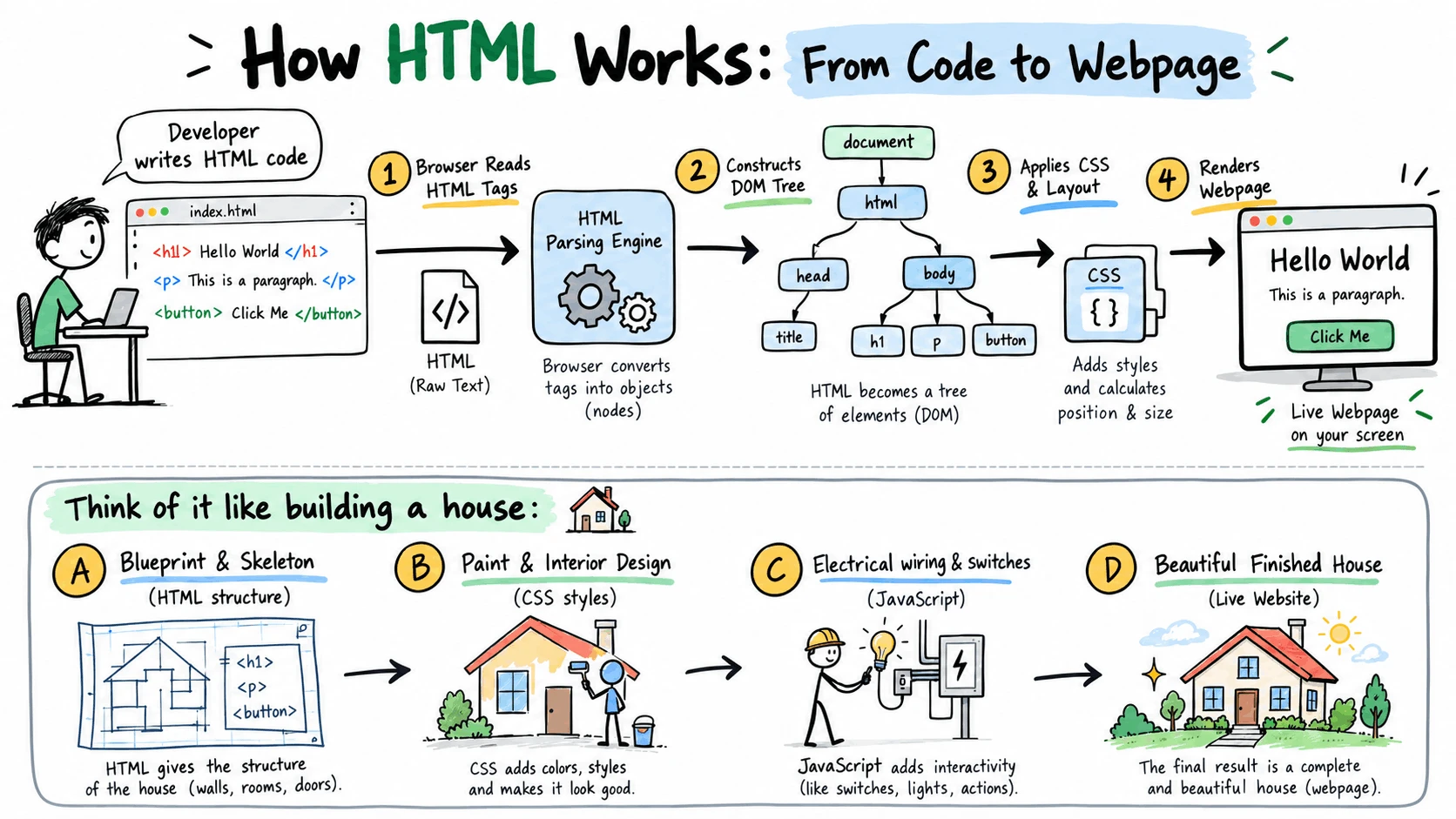
1. How the Live HTML Execution Sandbox Works
Unlike traditional server-side rendering tools that require network roundtrips to compile templates, our Live HTML Viewer utilizes the native HTML5 srcDoc inline frame specification. Every time you enter a keystroke or paste markup on the left, the browser's rendering engine immediately re-parses the DOM tree and paints the visual output into an isolated context with zero latency.
Changes in the left editor update the preview and minifier simultaneously in real time without refreshing the page.
Supports both lightweight HTML snippets (tags like <button> or <table>) and complete documents with <head> and <body>.
Switch between the live rendered iframe and the compressed, production-ready minified markup with a single click.
2. Understanding HTML5 Sandbox Security
Executing unverified or third-party HTML/JavaScript on a live website presents serious Cross-Site Scripting (XSS) risks. To guarantee absolute security, our preview engine implements the standard W3C sandbox="allow-scripts" security perimeter:
- No Same-Origin Access: Pasted scripts cannot access cookies,
localStorage, or session tokens belonging to DailyPartnerz. - No Window Hijacking: Sandboxed code cannot redirect the top-level parent browser window.
- No Form Submission Hijacking: Prevents unauthorized pop-ups and phishing dialogs.
- DOM Manipulation: Interactive JavaScript (buttons, toggle menus, calculators) executes smoothly.
- CSS & Animations: Full support for transitions, keyframes, Flexbox, and CSS Grid.
- External CDN Imports: You can load public styles like Bootstrap or FontAwesome inside the editor.
3. Capabilities & Supported Web Technologies Matrix
| Technology / Format | Support Level | How to Use in the Viewer |
|---|---|---|
| Semantic HTML5 Tags | Full Support | Test tags like <article>, <nav>, <dialog>, and <details> directly in the editor. |
| CSS3 & Responsive Styles | Full Support | Include inline <style> tags containing media queries, CSS variables, Grid, and Flexbox layouts. |
| Interactive Vanilla JS | Full Support | Embed <script> tags to test event listeners, DOM manipulation, timers, and interactive UI logic. |
| External CSS/JS CDNs | Full Support | Import libraries via standard CDN links (e.g., <link rel="stylesheet" href="https://cdn.jsdelivr...">). |
| HTML Email Newsletters | Full Support | Paste nested table structures and inline CSS styles to test layout rendering before sending campaigns. |
| SVG Graphics & Icons | Full Support | Paste raw <svg> markup to verify viewBox dimensions, fills, strokes, and vector scaling. |
4. Solving the 102 KB Gmail Email Clipping Problem
For email marketers and newsletter developers, HTML minification is not an optional optimization—it is critical. The Gmail desktop and mobile apps enforce an arbitrary cutoff rule: any email whose HTML payload exceeds 102 Kilobytes (KB) is automatically clipped.
- Gmail hides the remainder of the message behind a “[Message clipped] View entire message” link.
- The tracking pixel (located at the bottom of the email) is clipped, causing open rates to under-report by 20% to 40%.
- The mandatory unsubscribe link is hidden, violating the CAN-SPAM Act and GDPR regulations.
By clicking “Minify HTML” in our tool, comments and redundant whitespace are stripped instantly, frequently reducing email template size by 25% to 45% and keeping your message safely under the 102 KB threshold.
5. Best Practices for Semantic HTML & SEO Architecture
- Use Semantic Containers: Prefer
<main>,<article>, and<section>over generic<div>wrappers. - Maintain Heading Hierarchy: Never skip levels (e.g., jump from
<h1>directly to<h4>). - Descriptive Image Alt Text: Always supply informative
altattributes for search engines and screen readers.
- Declare Valid Viewport: Always include
<meta name="viewport" content="width=device-width, initial-scale=1">. - Self-Closing Tags: Follow modern HTML5 syntax (e.g.,
<img>and<input>do not require closing slashes). - Eliminate Inline Style Bloat: Consolidate repetitive styling into clean CSS classes to minimize overall document weight.
6. Frequently Asked Questions
Does the Live HTML Viewer support external stylesheets and JavaScript libraries?
Yes. You can paste standard CDN <link> and <script> tags for frameworks such as Bootstrap, Tailwind CSS, FontAwesome, jQuery, and Google Fonts. They will download and execute seamlessly inside the sandboxed iframe.
Is my HTML code uploaded, stored, or logged on your servers?
No. 100% of the parsing, rendering, and minification runs locally within your browser memory using native DOM APIs. We do not transmit, log, or cache your code on remote servers, making this tool completely safe for proprietary business logic and client templates.
Can I preview complete HTML boilerplates or only partial snippets?
Both. You can paste an entire production document beginning with <!DOCTYPE html><html>, or simply paste a single component snippet such as a button, card, or modal. The browser rendering engine parses and displays both formats automatically.
How does the “Minify HTML” algorithm work?
The minification engine removes HTML comment blocks (<!-- ... -->), collapses multi-line indentation into single spaces, and eliminates unnecessary whitespace between consecutive closing and opening tags (><). This significantly reduces file weight while preserving complete DOM hierarchy and styling.
How does this tool differ from browser Developer Tools (F12)?
Browser DevTools inspect the active DOM of an existing website. Our Live HTML Viewer provides a standalone, clean-slate sandbox where you can test uncommitted code, prototype new UI concepts, minify templates for export, and experiment without interference from browser extensions or existing website styles.