The Complete Marketing Taxonomy & UTM Governance Guide
Urchin Tracking Module (UTM) parameters are standardized query snippets appended to URLs that allow web analytics engines—such as Google Analytics 4 (GA4), Mixpanel, Adobe Analytics, and modern CRM systems—to accurately trace where incoming web traffic originates. Originally developed by Urchin Software Corporation (which was subsequently acquired by Google to form Google Analytics), UTM parameters remain the gold standard for measuring multi-channel digital marketing performance, campaign attribution, and return on ad spend (ROAS).
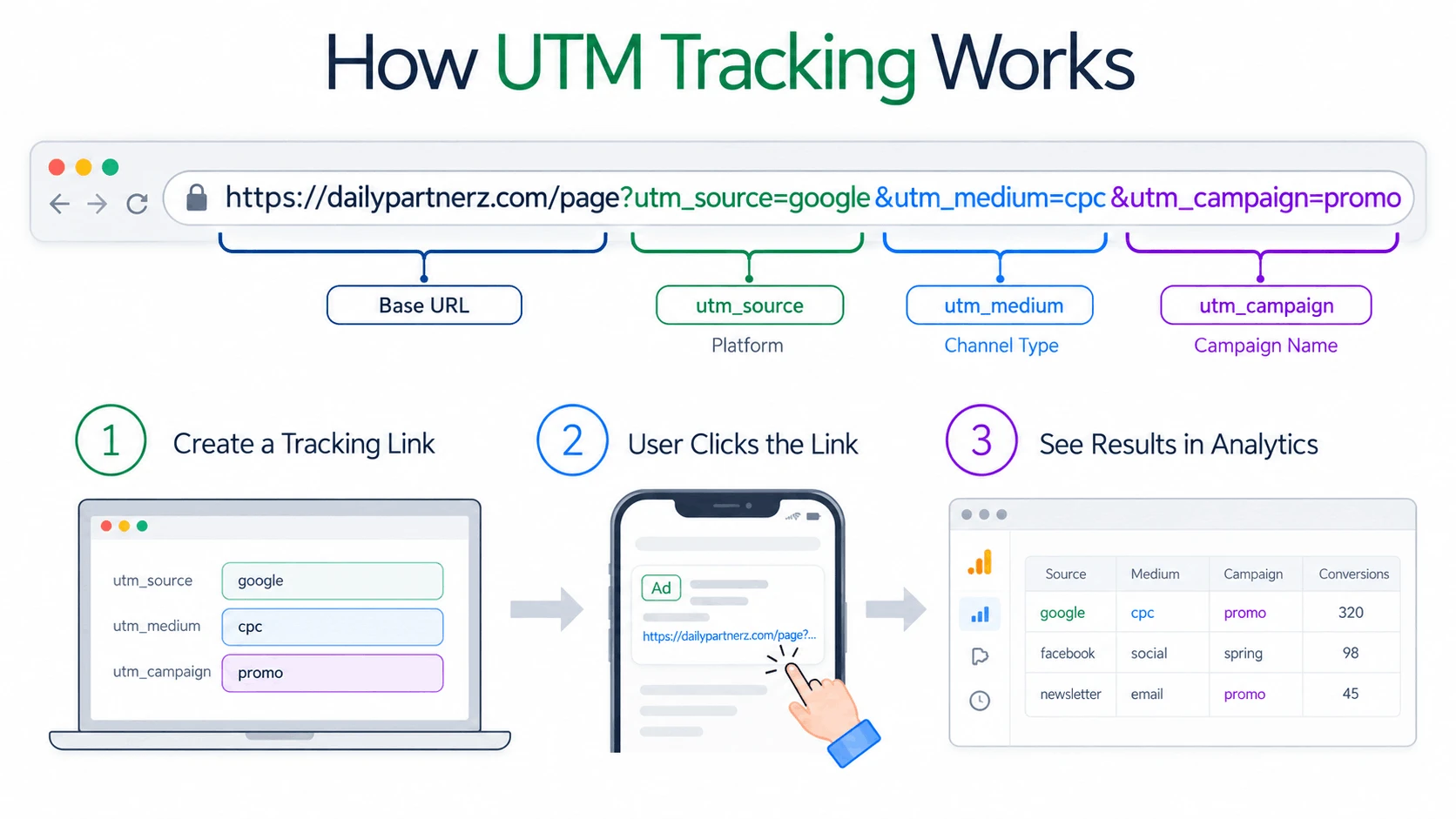
1. The 5 Core UTM Parameters Explained
Every tracking parameter has a distinct role in structuring campaign reports. Mixing them up leads to misleading analytics and misallocated advertising budgets.
| Parameter | Status | Example Values | Role in Analytics & Reporting |
|---|---|---|---|
utm_source | Required | google, facebook, newsletter, linkedin | Identifies the specific platform, advertiser, or publication that delivered the visitor. |
utm_medium | Required | cpc, email, social, affiliate, referral | Defines the high-level marketing medium. GA4 uses this parameter to populate Default Channel Groupings. |
utm_campaign | Recommended | spring_sale_2026, q2_webinar, brand_awareness | Groups all promotional assets across platforms under a unified strategic business initiative. |
utm_term | Optional | developer_tools, running_shoes, crm_software | Captures targeted search keywords in paid search (PPC) or specific target audience segments. |
utm_content | Optional | hero_cta_green, text_link_footer, sidebar_banner_300x250 | Differentiates creative versions, ad designs, or distinct placements pointing to the exact same destination. |
2. Choosing a Marketing Taxonomy Architecture
A marketing taxonomy is the set of standardized naming conventions that your team agrees to follow when building tracking URLs. Without a defined taxonomy, historical data degrades over time. There are four established taxonomy models:
Simple, human-readable descriptors. Best for small marketing teams running straightforward campaigns:
utm_campaign=summer-launchCombines geography, channel, and funnel stage separated by underscores. Enables powerful regex filtering in GA4:
utm_campaign=us_paid-search_boff_retargetingEncodes specific campaign dimensions into abbreviated key-value pairs for automated data warehouse extraction:
utm_campaign=geo-us_aud-devs_off-20pctUses an internal numeric identifier that maps to an internal campaign management database or CRM record:
utm_campaign=cmp-840293. How Inconsistent Tagging Causes Data Fragmentation
Google Analytics 4 is strictly case-sensitive. When team members, agencies, or contractors apply ad-hoc naming styles, analytics reporting shatters into fragmented rows.
utm_source=facebook→ 1,200 sessionsutm_source=Facebook→ 850 sessionsutm_source=fb→ 420 sessionsutm_source=FB_Ads→ 110 sessions
Result: Four fragmented rows for the same channel, breaking aggregated ROI reporting.
utm_source=facebook→ 2,580 aggregated sessions- Consistent lowercase enforcement across all campaigns
- Single, accurate data row in GA4 Traffic Acquisition
- Clean export to Looker Studio and PowerBI dashboards
4. Channel-by-Channel UTM Tagging Matrix
To ensure Google Analytics 4 accurately categorizes sessions into its default channel groupings (such as Paid Search, Organic Social, Paid Social, and Email), adhere to these standardized parameter combinations:
| Marketing Channel | Source (utm_source) | Medium (utm_medium) | Example Assembled URL Query |
|---|---|---|---|
| Google Search Ads (PPC) | google | cpc | ?utm_source=google&utm_medium=cpc&utm_campaign=brand_search&utm_term=dev_tools |
| Meta / Facebook Ads | facebook | paid_social | ?utm_source=facebook&utm_medium=paid_social&utm_campaign=summer_promo&utm_content=carousel_v1 |
| Instagram Bio Link | instagram | social | ?utm_source=instagram&utm_medium=social&utm_campaign=profile_bio_link |
| Weekly Email Newsletter | newsletter | email | ?utm_source=newsletter&utm_medium=email&utm_campaign=weekly_digest_42&utm_content=header_button |
| LinkedIn Sponsored Post | linkedin | paid_social | ?utm_source=linkedin&utm_medium=paid_social&utm_campaign=b2b_saas_leadgen&utm_content=whitepaper_pdf |
| Affiliate & Partner Referrals | partner_name | affiliate | ?utm_source=techradar&utm_medium=affiliate&utm_campaign=top_tools_list_2026 |
| YouTube Video Descriptions | youtube | video | ?utm_source=youtube&utm_medium=video&utm_campaign=tutorial_ep5&utm_content=timestamp_link |
5. Connecting Ad Spend to CRM Pipelines & Closed Revenue
Upper-funnel analytics like clicks and impressions are vanity metrics unless tied to downstream revenue. By configuring your website forms to read URL parameters via JavaScript and populate hidden input fields, UTM attribution values can be automatically passed into CRMs (HubSpot, Salesforce, Pipedrive) and payment engines (Stripe):
- Visitor clicks a tagged ad:
dailypartnerz.com/signup?utm_source=linkedin&utm_campaign=q2_enterprise - Your website script reads the URL parameters and stores them in hidden form fields or
sessionStorage. - When the lead submits a form, the UTM values flow directly into the CRM contact record.
- When the sales team closes the deal six months later, the exact original campaign and source receive attribution, proving precise Return on Ad Spend (ROAS).
6. 7 Non-Negotiable Rules of UTM Governance
- 1. Always Enforce Lowercase: Never mix capital letters. Treat lowercase as mandatory.
- 2. Use Hyphens or Underscores: Spaces encode as
%20or+, which looks spammy and breaks links. - 3. NEVER Tag Internal Links: Clicking a UTM link on your own site resets the visitor's session, creating false bounce rates and overwriting original traffic sources.
- 4. No Personally Identifiable Information (PII): Never include customer email addresses, phone numbers, or names in UTM parameters (strictly violates Google terms).
- 5. Maintain Self-Referencing Canonical Tags: Protect search engine rankings by ensuring canonical tags point to clean URLs.
- 6. Establish a Shared Team Dictionary: Maintain an approved list of sources and mediums so different team members don't invent conflicting terms.
- 7. Shorten Links for Public Displays: When sharing on social media or in print, use branded short links to keep URLs clean while preserving full parameter tracking.
7. How to View and Analyze UTM Data in Google Analytics 4
Once you have published your tagged URLs, navigate through the Google Analytics 4 reporting console:
- Open Google Analytics 4 → Select your property.
- Go to Reports → Expand Life cycle → Click Acquisition → Select Traffic acquisition.
- Change the primary dimension dropdown from Session default channel group to Session source / medium.
- Click the + icon next to the primary dimension to add a secondary dimension: Search for and select Session campaign.
- You will now see full session counts, engaged sessions, engagement rate, and conversion events broken down by exact campaign tags.
8. Frequently Asked Questions
Do UTM parameters hurt organic search engine (SEO) rankings?
No. Google Analytics tracking parameters do not negatively impact organic SEO rankings. Googlebot automatically strips query strings when determining search intent. However, to guarantee that multiple tagged links pointing to the same page are not treated as duplicate content, your landing pages must include a self-referencing canonical tag pointing to the clean base URL: <link rel="canonical" href="https://example.com/page" />.
What is the difference between Google Ads Auto-Tagging (GCLID) and UTM parameters?
Google Ads Auto-Tagging automatically appends a Google Click Identifier (gclid) to your destination URLs, which transmits proprietary conversion and cost data directly into linked GA4 properties. However, third-party analytics platforms, CRMs, and non-Google advertising networks cannot read gclid data. Using manual UTM parameters alongside auto-tagging ensures universal attribution across all software platforms.
What happens if someone makes a typo in a UTM parameter?
The link will still load the destination page normally without displaying a 404 error. However, inside GA4, the traffic will be logged under the misspelled parameter or classified into the “Unassigned” channel grouping, distorting historical reporting.
Can visitors see UTM parameters in their browser address bar?
Yes, UTM parameters are visible in the URL bar. If you prefer cleaner links when sharing on social media or email, you can shorten your tagged UTM link using a URL shortener or branded vanity domain.
Can I track cross-domain traffic with UTM parameters?
UTM parameters work when linking from an external website to your domain. However, for tracking users transitioning between two different domains that you own (e.g., from dailypartnerz.com to shop.dailypartnerz.com), you should configure GA4 Cross-Domain Measurement rather than tagging internal links with UTM parameters.